For
mobile phone parts wholesalers, importers and
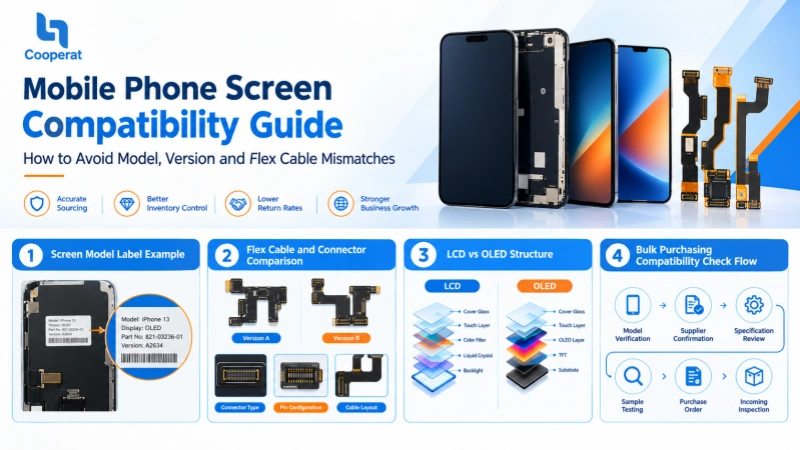
repair businesses, screen compatibility is one of the most important factors when sourcing replacement displays. Even when two screens look almost identical, differences in model numbers, regional versions, display technologies or flex cable configurations can make them incompatible.
For bulk buyers, a compatibility mistake can have consequences far beyond a single failed repair. Incorrect stock may lead to customer complaints, higher return rates, delayed orders, additional shipping costs and cash flow pressure. When hundreds or thousands of screens are involved, even a small mismatch rate can significantly affect profit margins.
With 20 years of experience in mobile phone parts wholesale and export,
Cooperatlcd understands the importance of accurate product identification and reliable sourcing. This guide explains how to verify phone screen compatibility, prevent common purchasing mistakes and build a more efficient wholesale procurement process.
1. What Is Mobile Phone Screen Compatibility?
Mobile phone screen compatibility refers to whether a replacement display can be correctly installed and function as expected on a specific phone model and hardware configuration.
A compatible screen should meet several requirements:
- Correct model:The display is designed for the exact phone model or a verified compatible model.
- Correct version: The screen matches the relevant hardware revision or model variant.
- Compatible connector: The connector type, pin configuration and electrical interface are appropriate.
- Correct flex cable: The cable layout, length, position and connection design match the phone.
- Compatible display technology: LCD, OLED and other display configurations must be appropriate for the device.
- Correct functionality: Touch response, brightness, display output and other supported functions should operate as expected.
Compatibility is not determined by appearance alone. Two screens may share similar dimensions and connector shapes but still differ electrically or functionally.
For wholesalers, the objective is to confirm compatibility before purchasing in bulk, rather than discovering problems after inventory has arrived.
2. Check the Exact Phone Model Before Ordering
2.1 Do not rely on the marketing name alone
A smartphone's commercial name is only the starting point for identifying a replacement screen.
For example, a product family may contain standard, Plus, Pro and Pro Max variants. These devices may differ in screen size, resolution, connector design, display technology and internal layout.
Even within the same brand, screens from different generations are not automatically interchangeable.
Before requesting a quotation, buyers should collect the following information:
| Information |
Why it matters |
| Brand and model name |
Identifies the general device family |
| Exact model number |
Distinguishes specific device variants |
| Model code or hardware revision |
Helps identify differences between configurations |
| Display size and technology |
Helps verify physical and technical suitability |
| Original screen part number, when available |
Provides an additional identification reference |
| Product photos or connector photos |
Helps suppliers confirm visual and structural details |
2.2 Verify the model number using reliable sources
Depending on the phone brand, the model number may be found in the device settings, on the original packaging, on the rear label or through the manufacturer's official product information.
For damaged devices that cannot be powered on, repair technicians may need to consult the original packaging, device labels, service documentation or other reliable identification records.
Do not assume that two phones use the same screen simply because their names are similar.
Wholesale purchasing tip: Create a standardized model-identification sheet for every product line. Require your purchasing team and supplier to use the same model codes instead of relying on informal names such as “
iPhone screen” or “
Samsung display.”
3. Understand Model Versions and Regional Variants
One of the most frequently overlooked compatibility risks is the difference between model versions.
A device family may include different regional variants, hardware revisions or production configurations. These differences do not always affect the screen, but they should be checked rather than assumed to be irrelevant.
What should buyers verify?
First, confirm the exact device identifier. Record the model number and any available hardware revision information.
Second, check the supplier's compatibility reference. Ask whether the proposed replacement is confirmed for that specific variant, and request the relevant model list.
Third, identify exceptions. If one screen is claimed to fit multiple models, ask for a clear list of the supported model numbers and any known exclusions.
Fourth, validate uncertain combinations. When compatibility information is incomplete, purchase samples or arrange technical verification before committing to a large order.
Be especially careful when suppliers use phrases such as “universal fit,” “same series” or “compatible with all versions.” These descriptions should be supported by a model-specific compatibility list.
A well-organized compatibility database can help wholesale businesses reduce purchasing errors as their product catalog expands.
4. Check the Flex Cable and Connector Carefully
The flex cable connects the display assembly to the phone's internal circuitry. A mismatch in the cable or connector can prevent the screen from being installed correctly or functioning properly.
4.1 Compare the connector structure
When checking a replacement screen, compare:
- Connector shape and dimensions
- Pin count and contact arrangement
- Connector orientation and position
- Flex cable length and routing
- Cable attachment points and folding positions
Any additional connectors required by the assembly
A connector that appears similar may still have a different pinout or electrical configuration. Never force a connector into place or assume that physical similarity proves electrical compatibility.
4.2 Check the complete screen assembly
Some replacement screens are supplied as display-only panels, while others include additional components such as touch layers, frames, brackets or other assembly parts.
The exact configuration varies by product.
Before ordering, clarify whether the quotation refers to:
- Display with touch assembly
- Display assembly with frame
- Complete assembly with additional components
Confirming the supplied configuration helps prevent receiving products that do not meet your customers' repair requirements.
4.3 Request clear product photos
For unfamiliar models or products with multiple versions, request photos of the front, back, flex cable and connector.
Photos are useful for preliminary identification, but they do not replace a verified compatibility reference or functional testing.
Important: Do not attempt to modify a flex cable or connector to make an uncertain replacement fit. Incorrect modifications may damage the display, the device or its internal connectors.
5. Confirm Display Technology and Product Grade
Even when the model and connector appear correct, the display technology and product grade should be checked.
LCD vs. OLED
LCD and OLED displays use different display technologies and are not generally interchangeable without model-specific compatibility confirmation.
LCD panels typically use a separate backlight system. OLED panels produce light through their individual pixels and do not require a conventional LCD backlight.
These differences affect panel structure, power requirements, image characteristics and assembly design.
Hard OLED vs. Soft OLED
Hard OLED and Soft OLED are commonly used commercial categories in the replacement-screen market. Their structural construction and flexibility differ, and the available options depend on the target device and product specification.
A buyer should not assume that all OLED replacements for a particular phone have identical dimensions, durability or installation characteristics.
Original, refurbished and aftermarket screens
Wholesale buyers should also clarify the product's origin and refurbishment status.
- New original/OEM: The description should clearly define the actual product origin and specification. OEM terminology can be used differently by suppliers, so request confirmation rather than relying on the label alone.
- Refurbished original: Typically uses a recovered original display panel with glass replacement or other refurbishment work, depending on the product.
- Aftermarket replacement: Manufactured by a third-party supplier, with specifications and performance varying by product grade.
Ask suppliers to define the grade, included components, testing standard and warranty terms in writing.
The goal is to ensure that the sample, quoted specification and delivered goods correspond to the same agreed product standard.
6. A Step-by-Step Compatibility Checklist for Bulk Buyers
Before confirming a wholesale order, use the following workflow.
Step 1: Prepare a complete model list
List each target phone model separately. Include the exact model number and variant wherever possible.
Avoid combining several similar models into one line without verifying their compatibility.
Step 2: Request the supplier's compatibility confirmation
Send the model list to your supplier and ask them to confirm which screen part numbers match each device.
If one replacement screen supports several models, request the exact list of supported variants.
Step 3: Compare technical specifications
Verify display technology, dimensions, connector structure, flex cable layout and supplied assembly configuration.
Flag any item for which the available information is incomplete.
Step 4: Confirm the product grade and condition
Specify whether you require original, refurbished original or aftermarket screens. Define the expected quality grade, packaging, functional test requirements and warranty conditions.
Step 5: Test samples where necessary
For new suppliers, unfamiliar models or high-value orders, test samples before approving mass production or shipment.
Where practical, verify installation, display output, touch response, brightness, connector fit and other functions supported by the device.
Step 6: Approve a written purchase specification
The final quotation or purchase order should identify the product code, compatible models, grade, quantity, packaging and agreed quality requirements.
This creates a reference for receiving inspection and helps resolve disagreements if the delivered products do not match the order.
Step 7: Inspect incoming stock by SKU
When the shipment arrives, compare labels and quantities against the purchase order. Test products according to the agreed inspection plan, with particular attention to new or high-risk SKUs.
Do not mix visually similar but unverified products in the warehouse.
7. Common Screen Compatibility Mistakes to Avoid
| Common mistake |
Potential consequence |
Recommended prevention |
| Ordering by marketing name only |
Wrong screen model |
Verify exact model numbers |
| Assuming similar versions use the same screen |
Incompatible inventory |
Check hardware variants |
| Checking connector appearance only |
Installation or electrical failure |
Verify connector specifications and compatibility |
| Ignoring flex cable differences |
Incorrect fit or connection |
Compare cable layout and part references |
| Mixing LCD and OLED specifications |
Incorrect product selection |
Confirm display technology |
| Failing to define product grade |
Quality disputes |
Record the agreed grade in writing |
| Skipping sample validation |
Large-scale defects or returns |
Test samples before major orders |
| Mixing unverified SKUs |
Warehouse picking errors |
Use SKU labels and compatibility records |
For international wholesalers, these controls are especially important because cross-border returns can involve additional freight costs, customs procedures and extended replacement lead times.
8. How to Reduce Inventory and Cash Flow Risks
Compatibility management is not only a technical issue. It is also a purchasing and inventory management strategy.
An incorrect screen can tie up working capital, occupy warehouse space and create stock that is difficult to resell.
Wholesale buyers can reduce these risks through several practical measures.
Use sales data to guide purchasing
Review sales frequency, customer demand and return history by SKU. Prioritize proven models instead of buying large quantities simply because a supplier offers an attractive unit price.
Start with controlled quantities
For new or uncertain models, use sample orders or smaller initial quantities. Increase order volume after compatibility and quality have been validated.
Keep model-specific inventory records
Record the model codes, supplier references, product grade, inspection results and customer feedback for every SKU.
This information helps purchasing teams identify recurring issues and make better replenishment decisions.
Consider mixed-model purchasing
If a supplier supports flexible mixed orders, buyers can source a wider range of verified models without committing excessive capital to a single SKU.
This approach can be useful for wholesalers serving repair shops with varied device portfolios. However, mixed orders should still be based on clear model identification and confirmed specifications.
Measure the total cost, not just the unit price
The lowest purchase price does not necessarily produce the best business result.
Consider the total landed and operating cost, including product cost, shipping, inspection, expected defect rates, return handling and inventory holding costs.
Reliable compatibility information and consistent quality control can help protect margins over the long term.
9. How to Choose a Reliable Wholesale Screen Supplier
For buyers placing repeat orders, a dependable supplier should provide more than a product catalog and a competitive quotation.
Evaluate potential partners against the following criteria:
1. Model coverage and identification support
Can the supplier provide clear product codes, model references and compatibility information for the screens you need?
2. Consistent product specificationsCan the supplier define product grades, display technology, included components and quality requirements before an order is placed?
3. Quality control before shipmentDoes the supplier have an inspection process to identify defects and verify products against the agreed specifications?
4. Flexible procurement arrangementsCan the supplier support mixed-model purchasing, practical minimum order quantities and payment arrangements suited to your business?
5. Reliable export logisticsCan the supplier coordinate international shipping, appropriate packaging and shipment documentation for your destination market?
6. Responsive after-sales communicationCan the sales team help investigate model mismatches, quality concerns and replenishment requirements?
7. Long-term supply capabilityCan the supplier support repeat purchasing, maintain clear order records and help you plan stock across different phone models?
The right supplier should help you improve purchasing accuracy, reduce avoidable losses and build a more predictable supply chain.
10. Build a More Reliable Screen Sourcing Partnership with Cooperatlcd
With 20 years of experience in mobile phone parts wholesale and export,
Cooperatlcd serves international importers, distributors, wholesalers and repair businesses that require dependable bulk sourcing.We understand that our customers need more than individual replacement screens. They need clear product information, reliable communication, flexible purchasing arrangements and a supply partner that understands the operational challenges of international wholesale.
Cooperatlcd offers several advantages to support your business:
- Extensive model coverage: A broad range of products for major smartphone brands, helping buyers consolidate sourcing across different categories.
- Mixed MOQs and flexible payments: Practical purchasing options designed to help wholesale customers manage inventory and working capital.
- Quality control before shipment: Inspection procedures to help ensure goods meet the agreed product specifications before dispatch.
- Neutral packaging and copyright-conscious presentation: Packaging arrangements designed to support international resale and reduce avoidable branding-related risks.
- Global shipping support: Logistics coordination for customers in different international markets.
- 24/7 Spanish-language support: Communication assistance for Spanish-speaking customers throughout the sourcing process.
Our goal is to help customers establish a more efficient, transparent and sustainable wholesale purchasing process.
Whether you are expanding your screen catalog, replenishing fast-moving models or consolidating several mobile phone parts categories into one sourcing relationship, our sales team can discuss your requirements and help identify suitable products and purchasing arrangements.
Ready to Source Mobile Phone Screens with Greater Confidence?
Before placing your next bulk order, prepare your model list, required screen grades, estimated quantities and target delivery market.
Contact the Cooperatlcd sales team to discuss compatibility requirements, product availability, wholesale quotations and long-term supply cooperation.Visit our official website:
https://cooperatlcd.com/Let's work together to reduce avoidable sourcing risks, improve inventory efficiency and build a stable, mutually beneficial wholesale partnership.


